Register your first client
A client is an application that asks this server for tokens. The console calls it an application. Every application lives in a project, and every project belongs to a team. That is three concepts, but they nest, so the console walks them in order.
Teams, projects, applications
Section titled “Teams, projects, applications”- A team owns things. Every project carries an owning team, and belonging to that team is what grants access to the project and everything in it. There is no separate list of named managers. Each administrator already has a personal team, which is usually a fine place for a first client; a regular team is a company or a set of colleagues you share work with.
- A project is a population of end-users: their accounts, and the policy for how they
register and verify themselves. It also holds the applications that sign those people in and
the APIs they get tokens for. A project you create is also a tenant with its own issuer — it
is served at
<ISSUER>/<slug>, on a subdomain of the instance, or at a hostname of its own, and mints tokens carrying that issuer, so an application in it integrates against that address rather than the bare one. The defaultredfoxproject is the exception: it keeps the bare issuer, which is what lets an existing deployment stay as it is. - An application is an OAuth client. It belongs to the project it was created in for its whole life; no operation moves it to another project.
-
Choose a team. The dialog that creates a project asks which team it goes in, starting from the one chosen at the top of the console. Your personal team is fine for a first client, but it has exactly one member, so work you will share belongs in a regular team, created under Teams, or is moved there later.
-
Create a project under Projects, with New project. It takes a name and an address: a path, which becomes the last part of the issuer in its tokens, or a subdomain such as
acme.auth.example.comwhen the instance offers one; a super administrator can also give it a hostname of its own (Project addresses compares the three). Pick it deliberately: an issuer identifier is a promise made to every client configured against it, and changing it later is previewed and confirmed because every application in the project is affected. A new project is closed to sign-up unless you choose Anyone who can reach the sign-in page; you can change that later on its Sign-in tab.The Projects table shows each project’s address in its Address column. The reserved projects read served at the root there rather than a path, since they keep the bare issuer. Only a super administrator can add applications to the default
redfoxproject, and nobody can add them to the administrators’ project. -
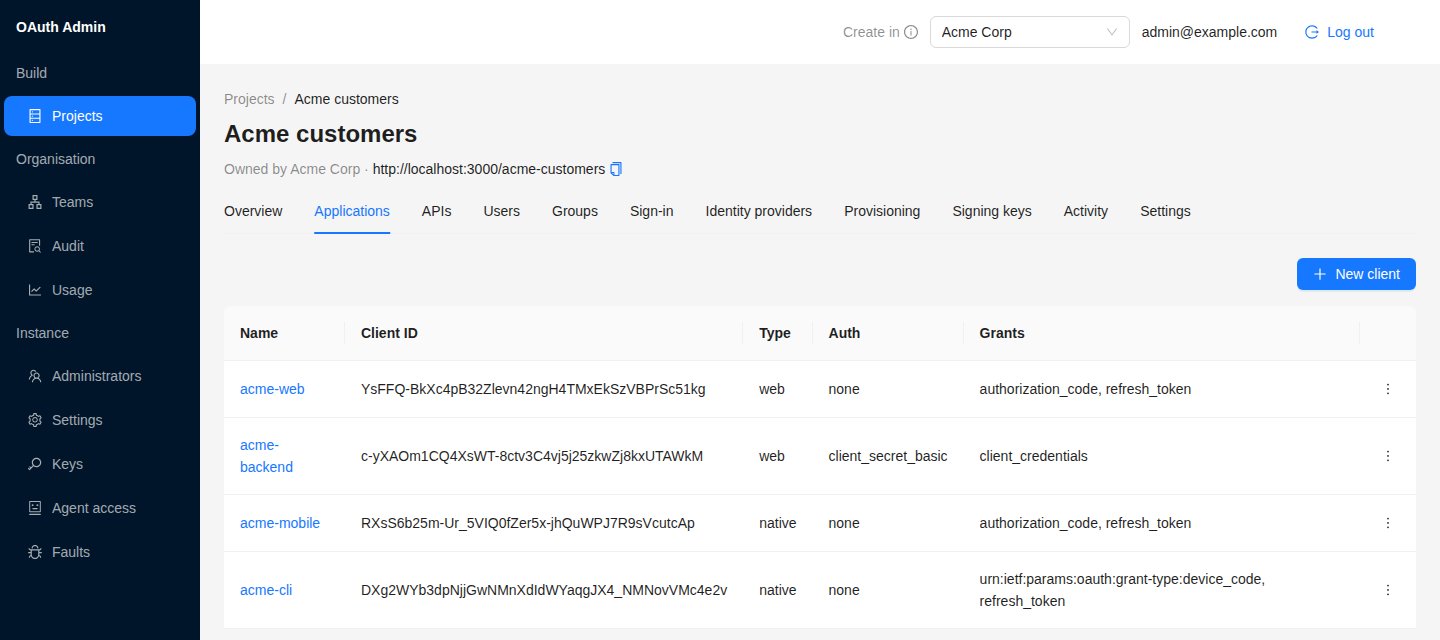
Create a client on the project’s Applications tab, with New client. Pick the application type and the token endpoint authentication method, then enter the redirect URIs. The next section is about that choice. If browser code on another origin will call the token endpoint, list that origin under Browser origins; the list can be copied from another application of the same project.
Public or confidential
Section titled “Public or confidential”The choice is the token endpoint auth method, and it follows from whether your application can keep a secret:
| Method | Use for | Credential |
|---|---|---|
none (public / PKCE) |
Browser SPAs, mobile and desktop apps, CLIs: anything shipped to the user | None. PKCE is the proof. |
client_secret_basic |
Server-side web applications and back-end services | A secret, sent in the Authorization header |
client_secret_post |
The same, where a client library can only put credentials in the form body | A secret, sent as a form field |
PKCE is not optional here for either kind. Every authorization request with response_type=code is
refused without a code_challenge, and S256 is the only accepted method. A request carrying
plain is rejected, and discovery advertises S256 alone. A public client with no secret is
therefore not a weaker client; the code it receives is useless to anyone who did not generate the
verifier.
Redirect URIs match exactly
Section titled “Redirect URIs match exactly”A redirect URI must be registered, and a request’s redirect_uri is compared against the registered
set as written: scheme, host, port, path and query all have to match. https://app.example.com/cb
and https://app.example.com/cb/ are two different URIs.
There is exactly one liberty, the one RFC 8252 §7.3 requires: a client whose application type is
native redirecting to http: on a loopback host may use any port. Everything else still matches
exactly. The liberty is narrow by design:
- native clients only; a web client’s redirect is a real host it controls, so nothing about it is ephemeral;
http:on a loopback host only; a claimed-httpsor private-scheme redirect stays exact;- and
localhostand127.0.0.1are not treated as interchangeable. Register both forms if your client might use either.
What stays open is a local port race: another process on the user’s machine could bind the port and receive the code. PKCE closes it, which is why it is mandatory.
Which users a client signs in
Section titled “Which users a client signs in”Login routing is decided by the project a client belongs to, never by the client itself:
- the reserved console client always goes to the administrators’ project;
- an application created in a project goes to that project;
- a client registered dynamically at a project’s address (its
/reg) belongs to that project; - a request that names one API declared at the address it was sent to goes to that API’s project;
- anything else (a client registered at the root, or one identified by a metadata document) goes
to the default
redfoxproject.
An application of the default redfox project is not pinned to it: rules 4 and 5 still apply to it.
The project is also where onboarding policy lives: whether registration is open
(registrationOpen), whether a new account must verify its e-mail
(emailVerificationRequired), whether that happens by link or by six-digit code
(verificationMethod), whether password sign-in is offered at all (passwordLogin), and whether an
authenticator app is required (totpRequired). None of it is set on the client. Two applications in
the same project share all of it, because they share the accounts.
Whether a project requires verification decides only who may sign in. It does not decide what applications are
told. A new account’s address counts as verified, and applications receive email_verified: true, only after it
is proven: by a link from the mailbox, by a trusted identity provider, or by an administrator who marks it.
Next: get your first token.