
Features
Everything is in the box. Most of it is switched off.
FoxAuth ships one server with no feature editions. Authorization Code with PKCE and OpenID Connect run from the first start, and most of the rest wait behind a named flag. In practice your attack surface is the set of features you actually asked for. Each card says whether its feature is on from the first start or waits for its flag.
On FoxAuth Cloud the flags are ours to set, and a plan limits what each project may create. On your own servers both are yours, and plans are off unless you turn them on. A card marked On in FoxAuth Cloud is switched on there.
Each flag below links to its entry in the Settings reference, which is generated from the code and names the default and the consequence.
Protocol
Every grant an OAuth 2.1 client can ask for.
The grants and endpoints. Authorization Code with PKCE and OpenID Connect are always on; most of the rest wait for a flag.
Authorization Code with PKCE
PKCE is mandatory for every client, public or confidential, as OAuth 2.1 requires. Redirect URIs match exactly.
OpenID Connect Core 1.0
ID tokens, the UserInfo endpoint and discovery, with the standard claim set and pairwise subjects.
Issuer identification
Every authorization response carries iss, so a client cannot be tricked into accepting another issuer’s code.
Resource Indicators
Audience-restrict a token with the resource parameter, and validate it at the resource server. On by default.
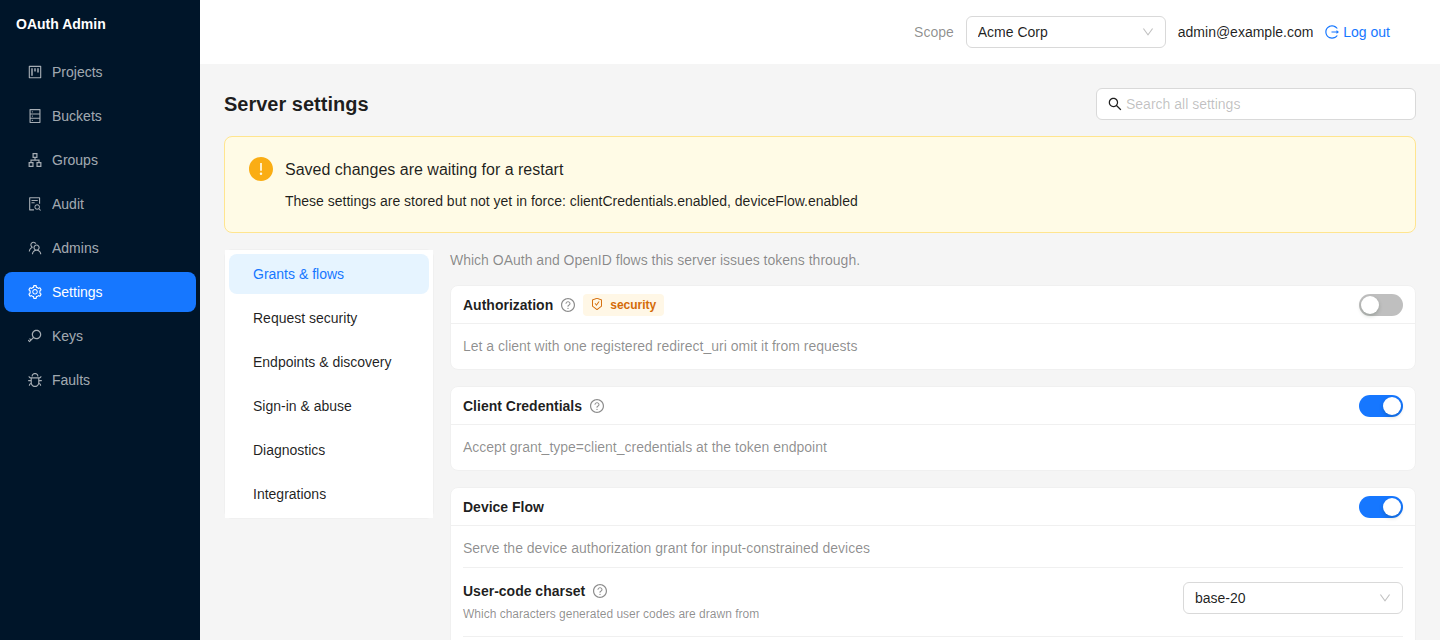
resourceIndicators.enabledOn in FoxAuth CloudRFC 8707
Client Credentials grant
Machine-to-machine tokens with no end-user, scoped per client.
clientCredentials.enabledOn in FoxAuth Cloud
Refresh Token grant
Long-lived sessions with rotation and reuse detection. Replay a token and the whole grant is revoked. On by default: offered while offline_access is a supported scope.
Device Authorization Grant
Sign in on a TV or a CLI by typing a user code on another device.
deviceFlow.enabledOn in FoxAuth CloudRFC 8628
CIBA
Client-initiated backchannel authentication: the client asks, the user approves out of band.
Pushed Authorization Requests
The client posts the request to the server first and sends only a request_uri through the browser.
par.enabledOn in FoxAuth CloudRFC 9126
Request objects
Signed request and request_uri parameters, so the authorization request itself is integrity-protected.
JARM
JWT-secured authorization responses, signed and optionally encrypted.
Rich Authorization Requests
Fine-grained authorization_details instead of a scope string, for payments and similar.
Token introspection
Resource servers ask the issuer whether a token is still active, and what it carries.
introspection.enabledOn in FoxAuth CloudRFC 7662
JWT introspection responses
Signed introspection responses, for a resource server that must prove what it was told.
Token revocation
A client retires an access or refresh token it no longer needs.
revocation.enabledOn in FoxAuth CloudRFC 7009
The claims parameter
Per-request claim selection, including essential claims and the acr request.
RP-initiated logout
End the session from the client, with a confirmation step so a link cannot log a user out silently. On by default.
rpInitiatedLogout.enabledOn in FoxAuth Cloud
Backchannel logout
Notify every client of a session that ended, server to server.
backchannelLogout.enabledOn in FoxAuth Cloud
Security
Sender constraint, and defences that are already on.
The banking-grade profiles are flags, not editions. The rest of this list is on from the first start.
DPoP
Sender-constrained access and refresh tokens, including server nonces, so a stolen token is not enough.
dpop.enabledOn in FoxAuth CloudRFC 9449
mTLS client authentication
Client certificates for authentication and certificate-bound access tokens.
FAPI profile behaviours
The stricter checks the Financial-grade API profiles require, as one switch.
Token and response encryption
Encrypted ID tokens, UserInfo and JARM responses using the client’s registered keys.
TOTP second factor
Per-project time-based one-time passwords, optionally enforced for the admin console.
Pairwise subject identifiers
A different sub per sector, salted from the database, so two relying parties cannot correlate a user.
Sign-in brute-force throttle
Persisted per-identity failure counters with escalating lockouts. A throttled refusal looks exactly like a wrong password.
Per-origin rate limiting
Tiered by route class and on by default, with the trusted-proxy hop configurable.
rateLimit.enabledOn in FoxAuth Cloud
CORS closed by data
An origin is readable only if the calling application lists it among its own allowed origins. No wildcard setting opens it.
cors.enabledOn in FoxAuth Cloud
Security headers
HSTS, Permissions-Policy, framing and content-type protections on every response.
Scope-based access control
Per-client scope enforcement, checked at the authorization endpoint and again at the token endpoint.
Administration
One management API, three front doors.
The console, the HTTP API and the MCP tools dispatch into the same routes, so the checks and the audit write cannot drift.
Administration console
Projects with their applications and APIs, administrators and their teams, end users, upstream providers, SCIM connections, settings, SMTP and signing keys. Every screen has an address. A change that could lock people out or break applications first says whom it affects, counted, and applies only once you confirm.
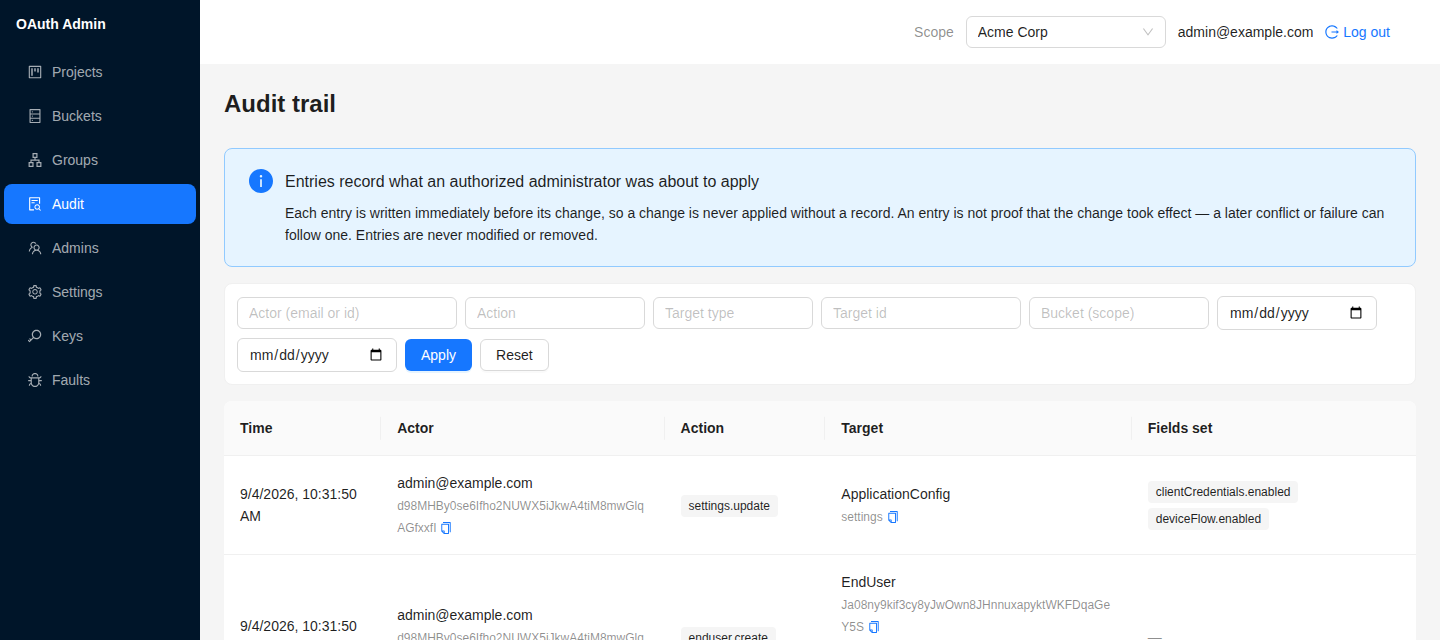
Append-only audit trail
Every state-changing admin action records actor, action, target and time. The entry is written before the mutation, and the store has no update or delete path.
Monthly active users per project
Each project counts the people it issued tokens to, once per UTC month and day, split into local sign-in, upstream sign-in, renewal and directory provisioning. A closed month never changes, and the history outlives the people and the project. Usage shows every project beside the team that owns it, so an instance run for other teams or customers can say who used how much.
Plans for a shared instance
A plan is a named set of limits on a project: monthly active users, applications, APIs, projects per administrator, enterprise sign-in, and whether the team names its address. A limit stops only something new: nothing that exists is switched off, and nobody is refused a sign-in. At the user cap, only new self-service sign-ups pause. A super administrator edits the plans and moves projects between them. Nothing is billed.
plans.enabledOn in FoxAuth Cloud
Administration over MCP
124 tools served to an AI agent at POST /mcp as an OAuth 2.1 protected resource, with two-call confirmation on high-consequence operations.
mcp.enabledOn in FoxAuth CloudRFC 9728
Authorization for your own MCP servers
Declare a third-party MCP server as a protected resource of a project and this server mints tokens whose audience is exactly that resource, with no code change here and no restart. In a project with an address of its own the declaration needs nothing from the resource — it can be internal, on localhost or not yet deployed — and another tenant may declare the same URL without affecting yours. Tokens are self-contained by default, so the resource verifies them against its project’s published keys without credentials of its own.
Client identity documents
A client_id that is an HTTPS URL naming a JSON document describing the client, retrieved and validated on demand and never stored — the mechanism the MCP authorization specification names first for a client with no prior relationship.
clientIdMetadataDocument.enabledOn in FoxAuth Cloud
Dynamic client registration
Clients register themselves, subject to the registration policy. Deprecated by the MCP specification in favour of client identity documents.
Registration management
Read, update and delete a registration with its registration access token.
Database-backed clients
Clients live in the server’s own store, created through the console, the API, dynamic registration or the setup script. There is no static client file.
Team ownership
Projects are owned by a team of administrators, and so is everything in them: end users, applications and APIs. Nothing but membership of the team grants access, and it is re-resolved on every request. A project moves to another team with everything it holds, in one step.
A project addressed by a path, a subdomain or a host
Each project is its own issuer, with its own metadata and signing keys, reached at exactly one address: a path beneath the server, a subdomain of it, or a hostname of its own. A subdomain or a hostname lets the browser isolate that project’s sign-in cookie by origin and publishes one metadata location instead of two. Subdomains cost one wildcard DNS record and certificate for the whole instance; a hostname costs a record and a certificate of its own. Changing an address is its own operation: it shows you which clients it will break before it breaks them.
Deleting a project can be undone
Delete switches a project off at once and destroys it 30 days later. Until then nothing in it is destroyed, and Restore brings it back with every session and refresh token still valid.
End-user self-service
Email verification and password reset per project, each with attempt caps, cooldowns and single-use links. An address counts as verified, and applications are told email_verified: true, only once it is proven: from the mailbox, by a trusted identity provider or directory, or by an administrator who marks it.
End-user administration
Invite a person to set their own password, mark an address verified, or sign someone out of one application and leave the others. Up to 100 people can be deactivated, activated, signed out or deleted at once, each with an audit entry of their own.
Sign in with Google, Microsoft, Apple or GitHub
Connect one by name and the console shows you what to do at the provider and the exact callback address to register; you supply only the values it issues. Any other OIDC provider can be configured by hand. Per project, so each tenant uses its own application. Try sign-in shows what a real sign-in would do before anyone relies on the provider, and the callback refuses an answer from an issuer other than the one the sign-in started with. Administrators can sign in to the console through your organisation’s provider too.
federation.enabledOn in FoxAuth Cloud
Sign-out at an upstream provider ends sessions here
When a person signs out at Keycloak, Auth0 or Ping, the provider sends a logout token. The sessions here that began with that provider session end, and the applications they reached are told. Offline access is kept, because a sign-out is not a compromise. Each provider is opted in on its own, and the token must be signed with the provider’s published keys.
federation.enabledOn in FoxAuth CloudOIDC Back-Channel Logout 1.0
Okta Universal Logout
An opted-in provider sends one signed request, and everything the person holds here ends: sessions, refresh tokens, and every access token the server can revoke. The account stays active, so the person can sign in again. It follows an Internet-Draft that has expired, so it has a flag of its own.
SCIM 2.0 provisioning
Microsoft Entra ID, Okta or any SCIM 2.0 directory creates, updates and removes a project’s users and groups. A removal of many people at once can be held for review instead of applied, and a replaced secret or static token keeps working until the directory has switched to the new one.
Signing key management
Each project with an address of its own signs with keys of its own, published at its own jwks_uri, so one tenant’s token never verifies at another’s resource server. The project’s owning team rotates them in one step — a new key is published before it may sign, and a retired one stays published until its tokens expire — and can revoke a compromised key at once, so nothing it signed verifies any more. The instance key set stays a super administrator’s.
Extensibility
Change behaviour without forking.
Named seams and one adapter interface, so your changes should survive an upgrade.
31 override seams
Account lookup, interaction policy, refresh-token rotation, resource resolution, pairwise identifiers, RAR handling and more, replaced at call time.
Pluggable storage
Every persisted model goes through one adapter interface. PostgreSQL, MongoDB and in-memory implementations ship; one connection string picks which.
Mountable Elysia app
Import the app and mount it in your own Bun service. There is no init step — importing is what boots it.
Built-in login and consent UI
React and Ant Design screens in English, Russian and Simplified Chinese, light or dark with the device. The consent page says who is asking and lets people choose what an app gets, and a connected-apps page lets them take it back. Theme the screens, or replace them through the interaction policy.
Operations
What you need when something is wrong.
Ship it, watch it, and find out why a request failed.
Published container image
ghcr.io/redfox-soft/oauth-server-ts, tagged per release and latest, with a Compose file that provisions the schema.
Server error store
Internal faults are recorded and readable in the console. Routine client rejections are correct behaviour and never appear.
Optional Sentry reporting
Reporting sits off the request path entirely: a fault reaches it only after it is classified as a defect, so responses are unchanged.
Settings you can read
Every server-wide setting is documented with its type, default and consequence, and edited in the console.
Machine-readable reference
The endpoint, settings, admin API, MCP tool and environment references are generated from the code itself.
Next
Compare it with what you run today.
We keep a factual, dated comparison against the servers teams usually weigh this against.
Already running something else? We keep dated, sourced comparisons with Auth0, authentik, Keycloak, Ory Hydra and Zitadel, each listing the pages we read and the date we read them.